Managing proposed business assets involves:
- Editing or deleting proposed business asset
- Viewing history
- Approving or rejecting proposed business assets
This topic walks you through managing proposed business terms. Similarly, you can manage other proposed business assets using the Business Glossary Manager module.
To manage proposed business terms, follow these steps:
- In the Asset Workspace pane, under the Business Terms node, click Proposed Assets.
The Proposed Assets page appears and displays a list of all proposed business terms.
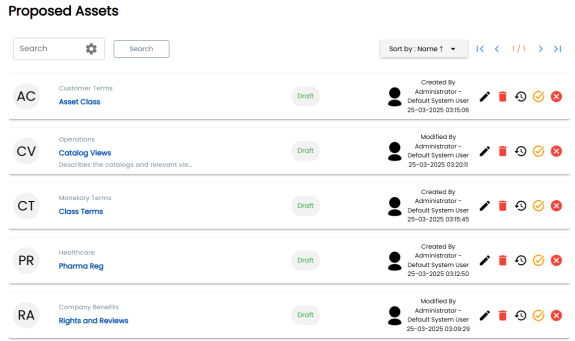
Use the following options to manage proposed business terms:
- Edit (
 )
) -
Use this option to edit a proposed business term.
- Delete (
 )
) -
Use this option to delete a proposed business term.
- History (
 )
) -
Use this option to view all the actions performed on a proposed business term.
- Approve (
 )
) -
Use this option to approve the proposed business term.
Once the asset is approved, neither the proposer nor the approver can edit it.
- Reject (
 )
) -
Use this option to reject a proposed business term.
Once the asset is rejected, you can edit and resubmit it for approval.